The Web Mechanics Wordpress Specials

Testimonials


“Ken was a fantastic resource to me in helping convert my website design and content into WordPress in order to allow greater flexibility. He also was very helpful in helping me understand the steps for starting and maintaining a blog as well as other neat things, using widgets that act as plug-ins for WordPress…whenever I have a question, I know he’s there to help me figure it out!”

Jen Berkley

 The Insight Advantage

Basic SEO with Categories, Tags and Keywords in WordPress


SEO (Search Engine Optimization) is certainly the elephant in the room these days. And there is much conflicting information as to what you should do to have your website to be highly ranked in search engines like Google, etc. You know how the Real Estate mantra is “Location, Location, Location“? Well, when it comes to coming up in search engine results, it’s “Content, Content, Content. If you have well written content about what ever your subject is, you have done 80-90% of your SEO basics.

My wife, Casey, is a popular an active Business Consultant (Her site is www.wisewomanshining.com). Many of her clients use WordPress for their websites and are befuddled with just how to use the WordPress  Categories, Tags and Keywords to their best advantage for SEO purposes. Casey has come up with a “101″ version for her clients and I am pleased to offer it to my Web Mechanic visitors.

Basic SEO with Categories, Tags and Keywords in WordPress

by Casey Dawes

Using categories, tags and keywords in your WordPress website or blog can be confusing. How do you distinguish between the three? What’s going to help your search engine optimization? What’s going to help your readers find what they’re looking for?


CATEGORIES

Categories should be limited. They’re a broad brush stroke to help your readers find information on a general topic. If you’re using “friendly” permalinks in your site’s posts or pages, category names can be part of the permalink name, although it’s not necessary. Category names should be between 2 and 5 words in length.

Let’s say you have a blog on cooking. Your categories might consist of:

  • Baking Tips
  • Grilling Tips
  • Crock-Pot Recipes
  • Main Dish Recipes
  • Cakes and Breads

These are broad strokes that can entice people to your blog and let them know that they’ve reached the right place. On the other hand, if your reader is searching for restaurant recommendations, they’ll probably move on.


TAGS

Tags are similar in nature to keywords. There are varying opinions about their effectiveness in influencing search engines, particularly Google. Based on my reading, I believe it’s best to think of them as subsets of Categories. Limit the number of tags you use. By keeping the words short, you’ll be able to give your readers a quick way to zoom in on a topic that they want to research more, particularly if you use a “Tag Cloud.”

Continuing the above example, you could have tags that say:

  • Pasta
  • Beef
  • Chicken
  • Vegetarian
  • Fish

Tags cross categories, so Beef tags could have posts from the Grilling Tips, Crock-Pot Recipes, and Main Dish Recipes categories.


KEYWORDS

Keywords and keyword phrases are important tools in search engine optimization. According to Google, Meta-Tags (a list of keywords that are invisible to the readers of your blogs, but visible to search engines) don’t carry much weight in their search algorithm; they appear to have more influence in some of the other search engines, such as Yahoo.

Keywords are the place to have your “long tail” phrases and words. Long-tail keywords and phrases are those that are esoteric—few people will search on any particular one, but having lots of ways for people to get to your blog will pay off in the long run.

Take time in defining your keywords for each specific post, even before you begin to write. Not only do your keywords need to go into the Keyword Section of your Platinum SEO Pack WordPress plug-in (or other SEO plug-in of your choice), but it’s important that they go in blog titles, headings, link phrases and bolded words. If you know of frequent misspellings of your keywords, include those in the keyword section.

Also be aware that you don’t need to duplicate keywords. If you have “angel hair pasta,” as a keyword, you don’t need to add “pasta” as a keyword. Search engines can figure it out. Try to drive your keywords to phrases (“angel hair pasta” rather than “pasta), because detailed phrases have less competition.

To continue the example above, some keywords might be:

  • Spaghetti carbonara
  • Pasta primavera
  • Angel hair pasta
  • Best oregano for Italian dishes

Finally…

If you have a search function on your blog, both keywords and tags will be important for the usability of your blog for readers.

By defining the structure of your site with categories, tags and keywords, you’ll be able to improve your search engine optimization and the reader-friendliness of your blog.

WordPress 101 – Permalinks

WordPress 101 – Permalinks

So what the heck is a Permalink and why do I care?

Until fairly recently, when you looked at the top of your browser, where you can type in the URLs of sites you want to visit, what you saw up there likely made sense. If you were on the site’s “About” page, at the end of the URL you probably saw … /about.html. If you were on the “Contact” page it said /contact.html. Made sense, didn’t it?

Continue reading WordPress 101 – Permalinks

The Web Mechanic’s WordPress 101

The Web Mechanic’s WordPress 101

Ok… You have decided to use WordPress for your website/blog, now what the heck do you do?

WordPress.orgThe Web Mechanic’s WordPress 101 will be a series of articles on setting up and using WordPress. I plan to write these articles on individual topics and will try to make them as “user-friendly” as I can. If something seems confusing or not explained clearly enough for you, please submit a comment and I’ll try to clarify things.

Continue reading The Web Mechanic’s WordPress 101

WordPress 101 – I have WordPress installed… Now what?

WordPress 101 – I have WordPress installed – Now what?

When WordPress is installed, it has a number of items that are set up generically. In this lesson I’ll go through some of the items you should take care of. Basic Housekeeping, as it were.

When your WordPress was installed you may or may not (depends on your webhost) have been prompted to supply a user name and password. WP will automatically give you a username of “admin” and a complex password if you are not asked to supply them. You should enter your own easy to remember username and password if requested.

Continue reading WordPress 101 – I have WordPress installed… Now what?

What size should your website be?

What Size Should Your Website Be?

Computers and the web have certainly progressed visually over the years.

Times have changed!
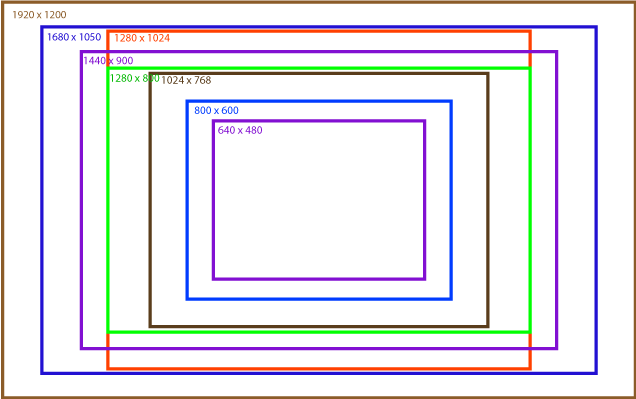
A comparison of monitor resolutions

A comparison of monitor resolutions

When the web began, most users had a monitor that had maybe a 13″ diagonal and showed a screen resolution of 640 x 480 pixels. (What’s a pixel? It’s basically how many dots go across your screen from left to right and top to bottom) Continue reading What size should your website be?